DFIR-IRIS
DFIR-IRIS is a collaborative digital forensics and incident response (DFIR) platform for managing cases, affected assets, evidence, timelines, analyst access, reporting, and closure.
What DFIR-IRIS does
IRIS is a digital platform built for collaboration among incident response analysts, enabling them to work together on detailed technical investigations. It can be set up on a standalone server or used as a portable application, making it suitable for on-the-go investigations in locations without internet access.
Choose your journey
How an investigation moves
Start with a clearly scoped case, connect the affected assets, preserve evidence with its source details, order the facts on the timeline, and only then write the report.
Lab architecture
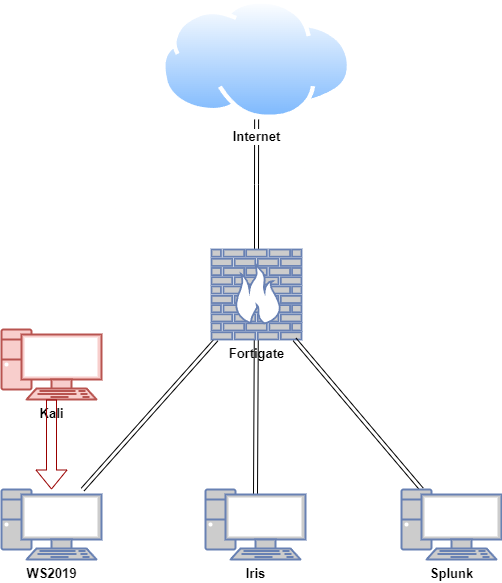
In this proof of concept, an attack simulation was conducted on a Windows Virtual Machine (VM) using Kali Linux in a safe and controlled environment. Both IRIS and Splunk Enterprise were installed on an Ubuntu VM.
Authorised lab only
Do not attempt to replicate the attack simulation demonstrated here unless you are properly trained and it is conducted in a secure and authorised manner. Unauthorised attack simulation can result in legal consequences and unintended damage to systems. Always ensure such activities are performed by qualified professionals in a secure, isolated environment.
| Host | OS | Role | IP Address |
|---|---|---|---|
| Fortigate | Fortios 7.6.0 | Firewall/Router | 192.168.1.111 (WAN) / 10.0.0.1 (LAN) |
| Iris | Ubuntu 22.04 LTS | IRIS | 10.0.0.50 |
| Splunk | Ubuntu 22.04 LTS | Splunk Enterprise | 10.0.0.120 |
| WS2019 | Windows Server 2019 | Splunk Universal Forwarder, Domain Controller | 10.0.0.140 |
| Kali | Kali Linux 2024.2 | Attacker machine | 10.0.0.29 |
Before you begin
Demonstrated versions
| Component | Version represented here | Note |
|---|---|---|
| DFIR-IRIS interface screenshots | 2.4.18 | Preserve the original visual walkthrough; minor labels can differ in later 2.4.x releases. |
| DFIR-IRIS installation target | 2.4.20 | Reproduces the checked-out release used by this guide. |
| Ubuntu | 22.04.4 LTS | Connected preparation host and isolated server. |
| Docker Engine packages | 28.0.0-era bundle | Revalidate package compatibility before adapting the build. |
The official DFIR-IRIS documentation lists newer 2.4.x releases. Follow this version set to reproduce the guide, or treat an upgrade as a separate test with its own snapshot, image digests, and rollback plan. The source and release history remain available in the official DFIR-IRIS repository.
Troubleshooting shortcuts
| Symptom | Start here |
|---|---|
| Docker does not start | Install Docker in the isolated VM |
| A DFIR-IRIS container exits or stays unhealthy | Load and start DFIR-IRIS |
| Administrator sign-in fails | Sign in and secure the lab account |
| Case fields or tabs differ from the screenshots | Manage an investigation and compare the demonstrated-version note above. |
| You do not have an isolated VM | Use the browser-based Interactive Lab. |