Use TShark
Use Wireshark's command-line companion to reduce a capture to relevant packets and independently verify the result.
Filter and write a reduced PCAP
TShark is the command-line version of Wireshark. It captures and displays packets when an interactive interface is unnecessary or unavailable. See the official TShark manual for the complete command syntax and current options.
Large captures can require substantial memory and processing time. Performance depends on packet count, enabled protocol dissection, analysis features, and available system resources rather than a fixed file-size threshold. If only traffic involving 23.63.254.163 is relevant, use TShark to write matching packets to a smaller PCAP and then inspect that file in Wireshark.
Open PowerShell and navigate to the directory where Wireshark is installed.
Run tshark.exe. Use -r to specify the source PCAP, -Y to apply a display filter while reading it, and -w to specify the output PCAP. Quote paths that contain spaces.
PS C:\Program Files\Wireshark> .\tshark.exe `
  -r "C:\Users\Administrator\Downloads\Wireshark-tutorial-extracting-objects-5-pcaps\Wireshark-tutorial-extracting-objects-from-a-pcap-1-of-5.pcap" `
  -Y "ip.addr == 23.63.254.163" `
  -w "C:\Users\Administrator\Downloads\Wireshark-tutorial-extracting-objects-5-pcaps\newdata.pcap"
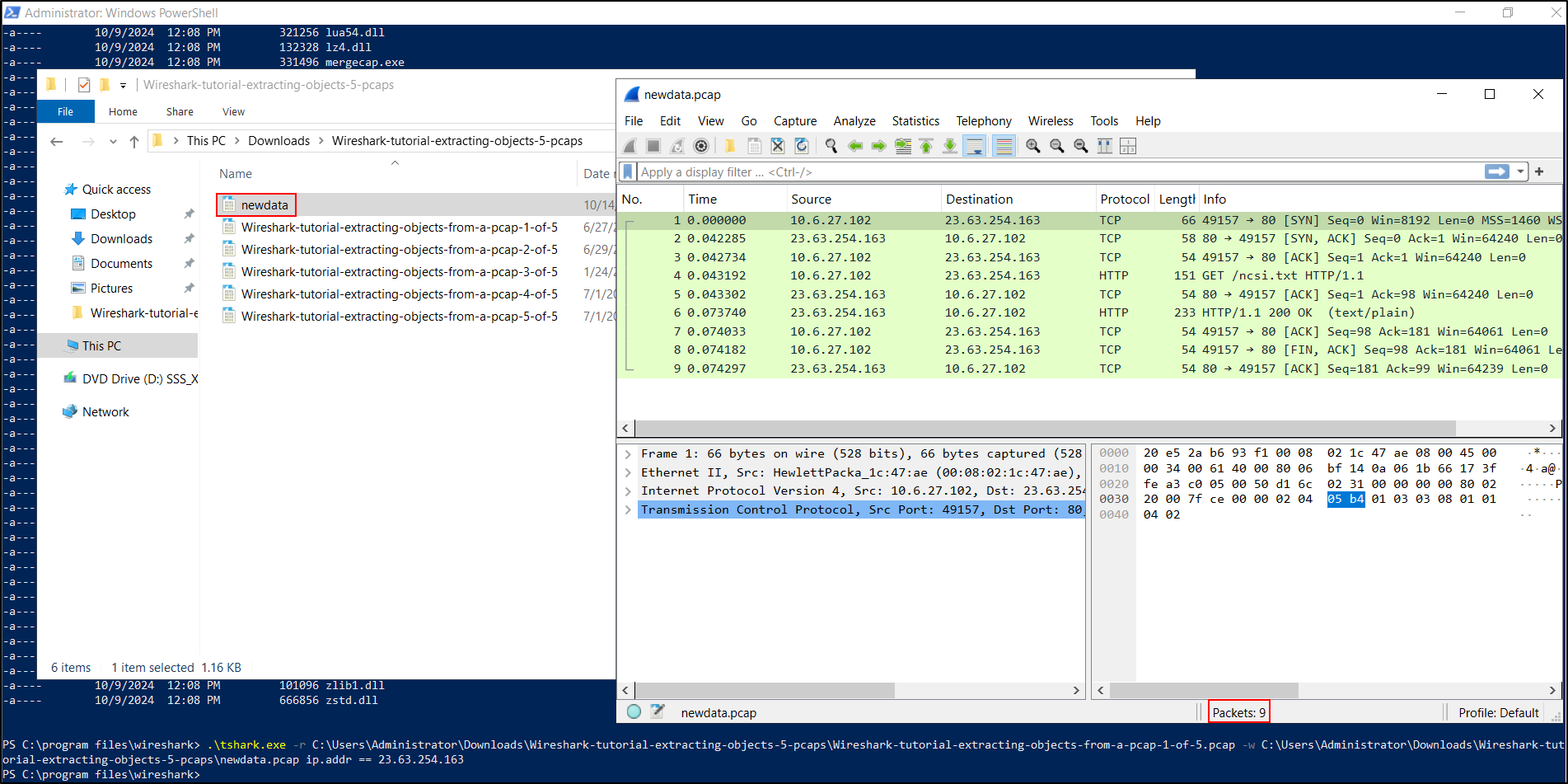
This produces a new PCAP file of manageable size, filtering on the IP address 23.63.254.163.
Verify the result before relying on it:
.\tshark.exe -r "C:\Users\Administrator\Downloads\Wireshark-tutorial-extracting-objects-5-pcaps\newdata.pcap" `
  -Y "not (ip.addr == 23.63.254.163)" `
  -T fields -e frame.number
The verification command should return no frame numbers.
TShark checkpoint
Open newdata.pcap in Wireshark and confirm that every displayed packet
involves 23.63.254.163 and that the capture contains the traffic needed
for the investigation.
Troubleshooting
| Problem | Start here |
|---|---|
| No interfaces appear on Windows | Repair or reinstall Npcap, then restart Wireshark |
| An interface appears but captures no relevant traffic | Confirm that you selected the active interface and that a capture filter is not excluding traffic |
| A display filter is rejected | Check spelling, protocol availability, and the display-filter syntax shown by Wireshark |
| An Export Objects menu is empty | Confirm that the PCAP contains supported, unencrypted application data and that the correct protocol is decoded |
| An SMB object is below 100% | The capture is incomplete; do not treat the exported object or its hash as authoritative |
| TShark writes no packets | Test the -Y expression without -w and confirm that the source PCAP contains the target address |