Install Shuffle Online
Install Shuffle with internet access using the original Ubuntu and CentOS procedures.
Version-sensitive walkthrough
The steps preserve the demonstrated build. Confirm current vendor prerequisites, container compatibility, and recovery commands before adapting it to another environment.
Connected installation procedure
Install Docker using the apt repository (Ubuntu)
Before you install Docker Engine for the first time on a new host machine, you need to set up the Docker repository. Afterward, you can install and update Docker from the repository.
Set up Docker's apt repository.
# Add Docker's official GPG key:
sudo apt-get update
sudo apt-get install ca-certificates curl
sudo install -m 0755 -d /etc/apt/keyrings
sudo curl -fsSL https://download.docker.com/linux/ubuntu/gpg -o /etc/apt/keyrings/docker.asc
sudo chmod a+r /etc/apt/keyrings/docker.asc

# Add the repository to Apt sources:
echo \
  "deb [arch=$(dpkg --print-architecture) signed-by=/etc/apt/keyrings/docker.asc] https://download.docker.com/linux/ubuntu \
  $(. /etc/os-release && echo "$VERSION_CODENAME") stable" | \
  sudo tee /etc/apt/sources.list.d/docker.list > /dev/null
sudo apt-get update
Install the Docker packages.
sudo apt-get install docker-ce docker-ce-cli containerd.io docker-buildx-plugin docker-compose-plugin
Verify that the Docker Engine installation is successful by running the hello-world image.
Install Docker Engine manually (Ubuntu)
All required DEB files for Docker Engine should be downloaded and transferred together in a folder named docker. Record the selected Ubuntu release, architecture, package versions, and checksums.
On Ubuntu host with internet connection:
Option 1
Run the following command:
Option 2
You will need to download a new file each time you want to upgrade Docker Engine. Select your Ubuntu version in the list.
Go to pool/stable/ and select the applicable architecture (amd64, armhf, arm64, or s390x).
Download the following deb files for the Docker Engine, CLI, containerd, and Docker Compose packages:
containerd.io_<version>_<arch>.debdocker-ce_<version>_<arch>.debdocker-ce-cli_<version>_<arch>.debdocker-buildx-plugin_<version>_<arch>.debdocker-compose-plugin_<version>_<arch>.deb
Install the .deb packages. Change directory into the docker folder and run:
Run sudo service docker start
Install Docker Engine manually (CentOS)
All required RPM files for Docker Engine should be downloaded and transferred together in a folder named docker. Record the selected CentOS release, architecture, package versions, and checksums.
On CentOS host with internet connection:
If you can't use Docker's rpm repository to install Docker Engine, you can download the .rpm file for your release and install it manually. You need to download a new file each time you want to upgrade Docker Engine.
Go to https://download.docker.com/linux/centos/ and choose your version of CentOS. Then browse to x86_64/stable/Packages/ and download the .rpm file for the Docker version you want to install.
Download the RPM packages that match the selected CentOS release and host architecture:
containerd.io_<version>_<arch>.rpmdocker-ce_<version>_<arch>.rpmdocker-ce-cli_<version>_<arch>.rpmdocker-buildx-plugin_<version>_<arch>.rpmdocker-compose-plugin_<version>_<arch>.rpm
Install the .rpm packages. Change directory into the docker folder and run:
Start the docker
Download Shuffle GitHub Repository
Clone or download the Shuffle repository as a zip archive from the Shuffle GitHub page. If git command cannot be installed, download the zip.
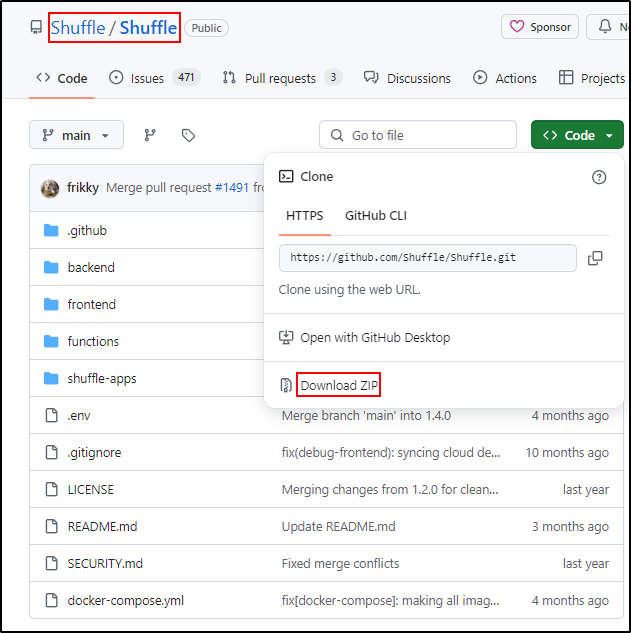
If Shuffle-main.zip is downloaded instead, unzip it to /opt and use
/opt/Shuffle-main consistently in the remaining commands.
sudo unzip Shuffle-main.zip -d /opt
sudo unzip python-apps-master.zip -d /opt/Shuffle-main/shuffle-apps
Change into the directory created by the selected download method. The commands below use the Git clone path.
Fix prerequisites for the Opensearch database (Elasticsearch):
cd /opt/Shuffle
mkdir shuffle-database                    # Create a database folder
sudo chown -R 1000:1000 shuffle-database  # IF you get an error using 'chown', add the user first with 'sudo useradd opensearch'

sudo swapoff -a                           # Disable swap
Run docker-compose.
Recommended for Opensearch to work well