Zui
Zui is an open-source desktop application for exploring and analysing structured data, particularly network-security evidence. It can import packet captures, use Brimcap to produce Zeek and Suricata records, and present the resulting events as searchable shapes, timelines, details, and correlations.
The pages in this journey preserve the original proof-of-concept investigation and screenshots while separating setup, querying, correlation, and practical work into focused activities.
Watch the Zui overview on YouTube
Choose your journey
You do not need to complete every activity. Start with the workflow that matches your goal, or use the Hands-on Labs page for a short guided simulation and a complete VM-based practical.
Zui searches records, not raw packets
Zui presents structured records derived from the capture. Use the record
type, time, addresses, uid, and community_id to find relevant activity,
then extract the associated packets when packet-level validation is needed.
Before you begin
Tested proof-of-concept environment
The screenshots record a particular Zui interface and proof-of-concept build. Later releases can use different menus, field names, packaging, or visual layouts. Record the exact application, operating-system, and data-source versions used in your own investigation.
| Component | Environment used in the PoC | Purpose |
|---|---|---|
| Zui | Desktop application shown in the walkthrough | Query and correlate network records |
| Ubuntu | 22.04 LTS | Analysis VM |
| Brimcap | Bundled with the demonstrated Zui installation | Process PCAP data with Zeek and Suricata |
| Wireshark | Installed on the same isolated VM | Validate or inspect extracted packet flows |
| FortiGate | FortiOS 7.6.0 | Firewall and router in the local topology |
How evidence moves through this proof of concept
When troubleshooting, work from left to right. Validate the source file and import before changing a query, and validate record correlation before drawing a conclusion from an alert or file hash.
Lab setup for the proof of concept
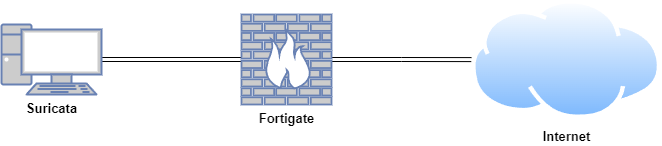
Zui and Wireshark were installed on an Ubuntu VM. Malware-traffic analysis was conducted in a safe and controlled environment.
| Host | OS | Role | IP address |
|---|---|---|---|
| FortiGate | FortiOS 7.6.0 | Firewall/router | 192.168.1.111 (WAN) / 10.0.0.1 (LAN) |
| Analysis VM | Ubuntu 22.04 LTS | Zui and Wireshark | 10.0.0.27 |
Treat imported malware captures as hostile evidence
Use a disposable, isolated VM with shared folders and unnecessary networking disabled. Do not execute extracted content. Packet captures can also contain credentials, personal data, and confidential communications.