Wazuh
Build an open-source security monitoring lab, collect endpoint and network telemetry, investigate detections, and test automated response in a safe, isolated environment.
What Wazuh does
Wazuh is an open-source security platform that brings together extended detection and response (XDR) and security information and event management (SIEM) capabilities. It helps organisations detect threats, monitor integrity, and support compliance across physical, virtual, containerised, and cloud environments.
Watch the Wazuh lab overview on YouTube
Choose your journey
Follow the journeys in order for a complete proof of concept, or start with the area that matches your lab goal. The complete lab guide retains the detailed commands and screenshots used in the demonstrated environment.
Before you begin
Documented baseline
The proof of concept documents the following lab baseline. Before starting,
define one <TESTED_VERSION> value in your working copy and use that exact
patch version for every central component and compatible agent package. The
4.14 download paths shown in the detailed procedure identify a release
family; they do not pin a patch. Record the resolved package versions,
architecture, checksums, and validation date before moving the bundle into the
isolated lab. Treat the examples as a reproducible baseline rather than a
substitute for the current vendor support and compatibility matrices.
Original walkthrough version
The originally published PoC used Wazuh 4.11.0 package examples. The
maintained installation procedure now uses the 4.14 release family and a
<TESTED_VERSION> placeholder so every central component can be pinned to
one compatible patch version. Keep 4.11.0 only when reproducing the
historical walkthrough; do not mix its packages with the maintained
procedure.
| Component | Documented version | Role |
|---|---|---|
| Wazuh central components | 4.14 release family; record exact patch | Manager, indexer, and dashboard must use the same patch version |
| Wazuh agents | Record exact package version per OS | Manager must be the same version or newer |
| Wazuh server OS | CentOS Stream 9 | All-in-one central deployment |
| Windows endpoint | Windows Server 2019 | Wazuh agent and Sysmon |
| Linux endpoint | Ubuntu 22.04 LTS | Wazuh agent and rsyslog relay |
| FortiGate | FortiOS 7.6.0 | Network event source |
| Kali Linux | 2024.2 | Controlled test host |
Use an isolated lab
Detection and response journeys generate attack-like activity and can modify accounts, firewall rules, files, or services. Use disposable systems, obtain authorisation, take snapshots, and review the cleanup steps before running a test.
Before starting, prepare:
- administrative access to the Wazuh server and monitored endpoints;
- working name resolution, time synchronisation, and routing between lab hosts;
- offline packages and certificates required by the selected deployment;
- a known-good VM snapshot or another tested recovery method; and
- enough indexer storage for the telemetry and archive settings you enable.
Retain a small build record with the lab evidence:
| Item | Value to record |
|---|---|
| Validation date | YYYY-MM-DD |
| Manager, indexer, dashboard | Exact package versions and SHA-512 checksums |
| Filebeat | Exact package version |
| Agents | Exact version and architecture for each endpoint |
| External test content | Source commit and checksum |
How data moves through this PoC
When troubleshooting, follow this path from left to right. Confirm the source created an event before checking collection, decoding and rules, indexing, and dashboard visibility.
Troubleshooting shortcuts
| Symptom | Start here |
|---|---|
| A central component does not start | Verify the installation and inspect the affected service's journal before changing configuration |
| An agent does not enrol | Troubleshoot endpoint enrolment and confirm address, ports, credentials, time, and manager reachability |
| Events arrive but no alert fires | Investigate the evidence, including the raw event, decoder, rule match, and archive settings |
| A dashboard field or pattern is missing | Check event storage, refresh the index pattern, and confirm the backing index exists |
| Active response does not run | Review the response procedure and confirm the rule ID, command mapping, endpoint support, and response log |
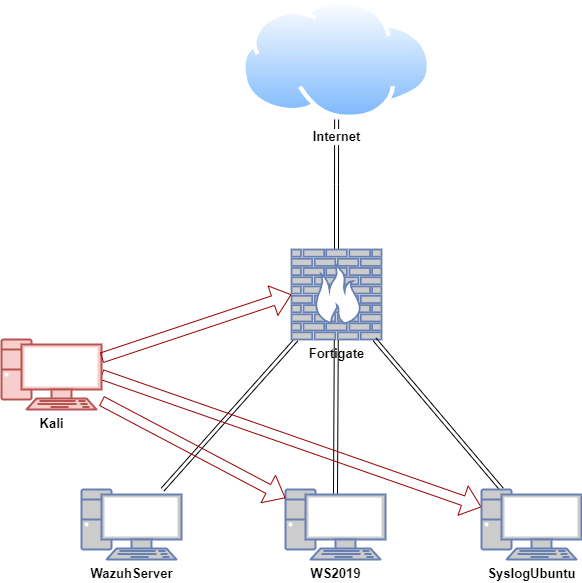
Lab architecture
| Host | OS | Role | Documented address |
|---|---|---|---|
| FortiGate | FortiOS 7.6.0 | Firewall and router | 192.168.1.111 WAN / 10.0.0.1 LAN |
| WazuhServer | CentOS Stream 9 | Wazuh server | 10.0.0.20 |
| WS2019 | Windows Server 2019 | Wazuh agent | 10.0.0.24 |
| SyslogUbuntu | Ubuntu 22.04 LTS | Wazuh agent and rsyslog relay | 10.0.0.26 |
| Kali | Kali Linux 2024.2 | Controlled test host | 192.168.1.161, 10.0.0.29 |