Install Shuffle Offline
Prepare and transfer the packages, images, repositories, and configuration needed for the demonstrated isolated deployment.
Version-sensitive walkthrough
Record every repository revision and image digest before transfer. Stop if the isolated deployment does not match the prepared dependency manifest.
Isolated installation procedure
This procedure will help you export what you need to run Shuffle on a no internet host.
Pre-requisite
- Both machines has Docker and Docker Compose installed already
- Your host machine already needs the images on it to make them exportable
Pull images on original machine
Shuffle need a few base images to work:
- shuffle-frontend
- shuffle-backend
- shuffle-orborus
- shuffle-worker
- shuffle:app_sdk
- opensearch
- shuffle-subflow
docker pull ghcr.io/shuffle/shuffle-backend
docker pull ghcr.io/shuffle/shuffle-frontend
docker pull ghcr.io/shuffle/shuffle-orborus
docker pull ghcr.io/shuffle/shuffle-app_sdk:latest
docker pull ghcr.io/shuffle/shuffle-worker:latest
docker pull opensearchproject/opensearch:2.14.0
docker pull frikky/shuffle-subflow
docker pull frikky/shuffle:shuffle-tools_1.2.0
docker pull frikky/shuffle:wazuh_1.0.0
docker pull frikky/shuffle:thehive_1.1.3
Be careful with the versioning for opensearch, all other are going to use the tag "latest". You will also need to download and transfer ALL the apps you want to use. These can be discovered as such:
Save images and archive them
mkdir shuffle-export
cd shuffle-export

docker save ghcr.io/shuffle/shuffle-backend:latest > backend.tar
docker save ghcr.io/shuffle/shuffle-frontend:latest > frontend.tar
docker save ghcr.io/shuffle/shuffle-orborus:latest > orborus.tar
docker save ghcr.io/shuffle/shuffle-app_sdk:latest > app_sdk.tar
##docker save frikky/shuffle:app_sdk > app_sdk.tar
##docker save ghcr.io/frikky/shuffle-worker:latest > worker.tar
docker save ghcr.io/shuffle/shuffle-worker:latest > worker.tar
docker save opensearchproject/opensearch:2.14.0 > opensearch.tar
docker save frikky/shuffle-subflow:latest > sublow.tar
docker save frikky/shuffle:shuffle-tools_1.2.0 > shuffle-tools.tar
docker save frikky/shuffle:wazuh_1.0.0 > wazuh.tar
docker save frikky/shuffle:thehive_1.1.3 > thehive.tar

git clone https://github.com/Shuffle/python-apps.git

wget https://raw.githubusercontent.com/Shuffle/Shuffle/master/.env
wget https://raw.githubusercontent.com/Shuffle/Shuffle/master/docker-compose.yml

cd ..
tar cvf shuffle-export.tar.gz shuffle-export
Export shuffle-export.tar.gz to the host without internet connection
Import docker images to host without internet
tar xvf shuffle-export.tar.gz -C /opt
cd /opt/shuffle-export
find -type f -name "*.tar" -exec docker load --input "{}" \;
Create folders to add the python apps
Create a folder called shuffle-database and change the ownership.
If you get an error using 'chown', add the user first with 'sudo useradd opensearch'
Disable swap
Set the vm.max_map_count kernel parameter to 262144. This is often needed for applications like Elasticsearch or Opensearch that require a higher limit for the number of virtual memory areas a process can have.
mkdir shuffle-database
sudo chown -R 1000:1000 shuffle-database
sudo swapoff -a
sudo sysctl -w vm.max_map_count=262144
Run docker images
Edit the image names in docker-compose.yml to align it with the output from docker images
docker images
REPOSITORY                               TAG                     IMAGE ID       CREATED         SIZE
registry.hub.docker.com/frikky/shuffle   shuffle-subflow_1.0.0   5ed48be6f649   33 hours ago    293MB
frikky/shuffle                           app_sdk                 1dde46cd09da   10 days ago     291MB
ghcr.io/frikky/shuffle-worker            latest                  adb137fa1718   15 months ago   44.4MB
opensearchproject/opensearch             2.5.0                   5a030d679ac7   18 months ago   1.17GB
ghcr.io/frikky/shuffle-backend           latest                  2e3d97ae8e30   21 months ago   57.9MB
ghcr.io/frikky/shuffle-frontend          latest                  be49fe2395d3   21 months ago   191MB
ghcr.io/frikky/shuffle-orborus           latest                  068b942b0302   21 months ago   29.9MB
services:
  frontend:
    image: ghcr.io/frikky/shuffle-frontend:latest

  backend:
    image: ghcr.io/frikky/shuffle-backend:latest

  orborus:
    image: ghcr.io/frikky/shuffle-orborus:latest

  opensearch:
    image: opensearchproject/opensearch:2.5.0
Run docker-compose.
Troubleshooting
Verify that there are no major errors in the logs and all containers are up and running
Check docker processes
docker ps

CONTAINER ID   IMAGE                                    COMMAND                  CREATED         STATUS         PORTS                                                                                NAMES
6304c903bdde   ghcr.io/frikky/shuffle-frontend:latest   "/entrypoint.sh ngin…"   3 minutes ago   Up 3 minutes   0.0.0.0:3001->80/tcp, [::]:3001->80/tcp, 0.0.0.0:3443->443/tcp, [::]:3443->443/tcp   shuffle-frontend
899ab92ccdd5   ghcr.io/frikky/shuffle-backend:latest    "./webapp"               3 minutes ago   Up 3 minutes   0.0.0.0:5001->5001/tcp, :::5001->5001/tcp                                            shuffle-backend
cccd0236ead3   ghcr.io/frikky/shuffle-orborus:latest    "./orborus"              3 minutes ago   Up 3 minutes                                                                                        shuffle-orborus
faa724f843ad   opensearchproject/opensearch:2.5.0       "./opensearch-docker…"   3 minutes ago   Up 3 minutes   9300/tcp, 9600/tcp, 0.0.0.0:9200->9200/tcp, :::9200->9200/tcp, 9650/tcp              shuffle-opensearch
Check docker container logs
docker logs shuffle-backend
docker logs shuffle-frontend
docker logs shuffle-orborus
docker logs shuffle-opensearch
Check loaded docker images
root@shuffleoffline:/opt/shuffle-exp# docker images
REPOSITORY                               TAG                                        IMAGE ID       CREATED        SIZE
frikky/shuffle                           TheHive-244ac27f71490576f2152f1a478763dd   04651821b9a9   11 hours ago   292MB
frikky/shuffle                           thehive_1.1.0                              04651821b9a9   11 hours ago   292MB
frikky/shuffle                           Wazuh-2f5945bb5a582a6b676ba7c212412cdb     c6e36c51b505   11 hours ago   292MB
frikky/shuffle                           wazuh_1.1.0                                c6e36c51b505   11 hours ago   292MB
<none>                                   <none>                                     15951f6d8452   25 hours ago   291MB
<none>                                   <none>                                     b99fc014293d   25 hours ago   291MB
<none>                                   <none>                                     5e2ccf369d65   25 hours ago   291MB
<none>                                   <none>                                     dafc616bc131   25 hours ago   291MB
<none>                                   <none>                                     71fa350d234f   25 hours ago   291MB
frikky/shuffle                           shuffle-tools_1.2.0                        4159398549c0   3 days ago     387MB
frikky/shuffle                           shuffle-tools_1.1.0                        5712b5ea194b   3 days ago     362MB
registry.hub.docker.com/frikky/shuffle   shuffle-tools_1.1.0                        5712b5ea194b   3 days ago     362MB
frikky/shuffle-subflow                   latest                                     5ed48be6f649   3 days ago     293MB
frikky/shuffle                           thehive_1.1.3                              9b1209a0ba38   3 days ago     297MB
frikky/shuffle                           app_sdk                                    1dde46cd09da   12 days ago    291MB
ghcr.io/shuffle/shuffle-frontend         latest                                     30c4090d085c   3 weeks ago    196MB
ghcr.io/shuffle/shuffle-worker           latest                                     9f7c39d5fb1e   3 weeks ago    79MB
ghcr.io/shuffle/shuffle-backend          latest                                     59613e03c036   3 weeks ago    93.4MB
ghcr.io/shuffle/shuffle-app_sdk          latest                                     3ac4837de611   3 weeks ago    291MB
opensearchproject/opensearch             2.14.0                                     bf1e1cd1fa30   2 months ago   1.33GB
ghcr.io/shuffle/shuffle-orborus          latest                                     7457cc8b6210   3 months ago   67.7MB
frikky/shuffle                           wazuh_1.0.0                                8a72f12273c6   3 years ago    66MB
If the orborus logs shows that it is trying to pull the images from the internet, tag your locally loaded images by running docker tag
docker logs shuffle-orborus
...
2024/09/07 23:36:59 [DEBUG] Pulling image ghcr.io/shuffle/shuffle-app_sdk:latest
2024/09/07 23:37:39 [ERROR] Failed getting image ghcr.io/shuffle/shuffle-app_sdk:latest: Error response from daemon: Get "https://ghcr.io/v2/": dial tcp: lookup ghcr.io on 127.0.0.53:53: read udp 127.0.0.1:58367->127.0.0.53:53: i/o timeout
If you are using older version of opensearch (< 2.14.0), you may encounter authentication issues as shown by the opensearch logs:
If this is the case, access the opensearch, navigate to /config/opensearch-security and edit the configuration file:
docker exec -it shuffle-opensearch /bin/bash
[opensearch@shuffle-opensearch config]$ cd config/opensearch-security/
[opensearch@shuffle-opensearch opensearch-security]$ cat internal_users.yml
---
# This is the internal user database
# The hash value is a bcrypt hash and can be generated with plugin/tools/hash.sh

_meta:
  type: "internalusers"
  config_version: 2

# Define your internal users here

## Demo users

admin:
  hash: "$2a$12$VcCDgh2NDk07JGN0rjGbM.Ad41qVR/YFJcgHp0UGns5JDymv..TOG"
  reserved: true
  backend_roles:
  - "admin"
  description: "Demo admin user"
The admin hash must match the unique OpenSearch password defined in .env.
# DATABASE CONFIGURATIONS
...
SHUFFLE_OPENSEARCH_USERNAME="admin"
SHUFFLE_OPENSEARCH_PASSWORD="<UNIQUE_LAB_PASSWORD>"
The bcrypt hash for the password should be:
Replace the current hash for the admin user in the internal_users.yml file with the newly generated hash.
After editing the internal_users.yml, apply the changes to OpenSearch by running the securityadmin_demo.sh script inside the OpenSearch container:
[opensearch@shuffle-opensearch opensearch-security]$ vi internal_users.yml
# "i" for insert, copy and paste theh hash, "Esc" then ":wq"
[opensearch@shuffle-opensearch opensearch-security]$ cd ../../
[opensearch@shuffle-opensearch ~]$ pwd
/usr/share/opensearch
[opensearch@shuffle-opensearch ~]$ ./securityadmin_demo.sh
[opensearch@shuffle-opensearch ~]$ exit
Change the file permission for *.pem in /usr/share/opensearch/config
Restart the shuffle-opensearch and shuffle-backend container
Pull and Save Docker images
All the required Docker images have been pulled as saved as shuffle_images.tar. For your reference, the steps for pulling and saving the required Docker images are documented below.
For this step, we are preparing images from a Ubuntu host with internet connection and Docker installed. The prepared images will then be transferred to the air-gapped environment.
On Ubuntu host with internet connection and Docker Engine installed:
Open docker-compose.yml file from Shuffle GitHub to identify the images you need.
Look for the image key under each service.
services:
  frontend:
    image: ghcr.io/shuffle/shuffle-frontend:latest
  backend:
    image:ghcr.io/shuffle/shuffle-backend:latest
  orborus:
    image: ghcr.io/shuffle/shuffle-orborus:latest
    ghcr.io/shuffle/shuffle-app_sdk:latest
    ghcr.io/shuffle/shuffle-worker:latest
  opensearch:
    image: opensearchproject/opensearch:2.14.0
Pull the Images using docker pull:
docker pull ghcr.io/shuffle/shuffle-frontend:latest
docker pull ghcr.io/shuffle/shuffle-backend:latest
docker pull ghcr.io/shuffle/shuffle-orborus:latest
docker pull opensearchproject/opensearch:2.14.0
docker pull ghcr.io/shuffle/shuffle-app_sdk:latest
docker pull ghcr.io/shuffle/shuffle-worker:latest
Verify the Images are pulled by running docker images
Save the docker images for a transfer to an air-gapped environment
docker save -o shuffle_images.tar ghcr.io/shuffle/shuffle-frontend:latest ghcr.io/shuffle/shuffle-backend:latest ghcr.io/shuffle/shuffle-orborus:latest opensearchproject/opensearch:2.14.0 ghcr.io/shuffle/shuffle-app_sdk:latest ghcr.io/shuffle/shuffle-worker:latest
Download GitHub repositories as a zip archives
All the required GitHub repositories are downloaded as Shuffle-main.zip and python-apps-master.zip. For your reference, the steps for downloading the required GitHub repositories are documented below.
On Ubuntu host with internet connection and Docker installed:
Download two repositories as zip archives from the Shuffle GitHub and Shuffle Python Apps GitHub page.
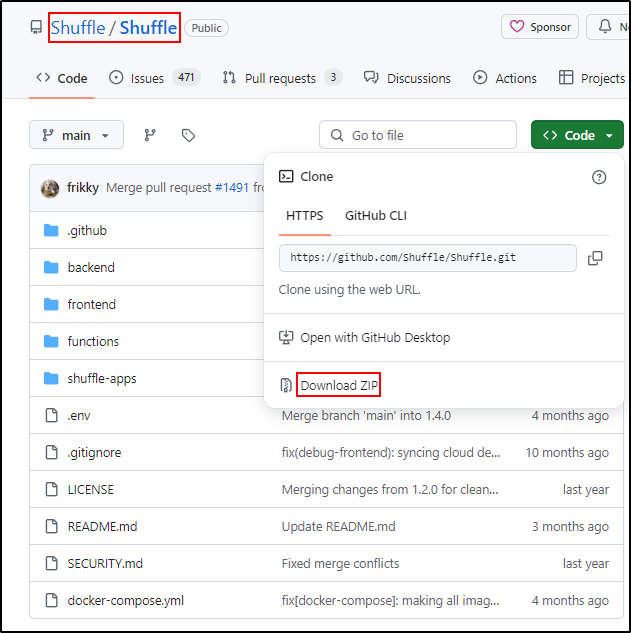
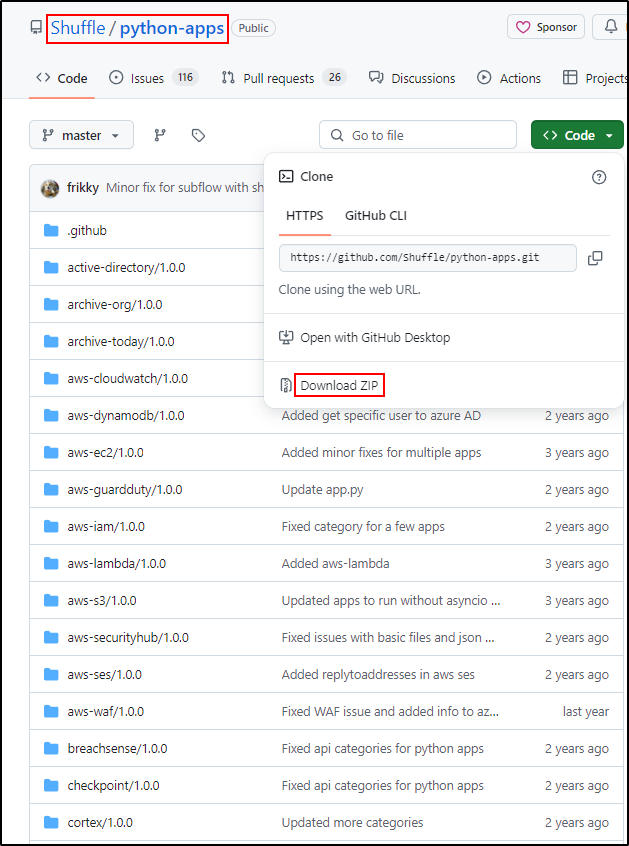
Transfer the docker folder, shuffle_images.tar, Shuffle.zip and python-apps.zip to the Ubuntu host without internet connection.
Repeat the steps above to install Docker Engine.
Load the Docker images:
Unzip Shuffle.zip to the /opt directory and python-apps.zip to the /opt/Shuffle-main/shuffle-apps directory
Change into /opt/Shuffle-main directory
Create “shuffle-database” folder
Run prerequisites for the Opensearch database (Elasticsearch):
cd /opt/Shuffle
sudo mkdir shuffle-database
# IF you get an error using 'chown', add the user first with 'sudo useradd opensearch'
sudo chown -R 1000:1000 shuffle-database
# Disable swap
sudo swapoff -a
In the /opt/Shuffle-main folder, run docker-compose.
Recommended for Opensearch to work well