Shuffle
Shuffle is an open-source security orchestration, automation, and response (SOAR) platform. It connects security tools and APIs into visible, repeatable workflows while retaining the inputs, decisions, actions, and results needed for review.
What Shuffle does
A Shuffle workflow receives an event through a trigger, validates and enriches the data, chooses a branch, pauses when human approval is required, and records the result of any action. This guide preserves the original Cyber Defence Kit proof-of-concept build and screenshots while presenting them as a structured learning path.
Watch the Shuffle proof-of-concept overview on YouTube
Choose your journey
You do not need to complete every section. Choose the journey that matches your environment and intended outcome:
If you are building the complete lab, review Before you begin and the proof-of-concept lab setup before completing the journeys in sequence.
Automation can affect real systems
Use synthetic indicators, least-privilege credentials, approval gates, and reversible actions. Never connect a training workflow to production controls.
How an alert moves through this PoC
Troubleshoot from left to right. Confirm the trigger received a complete event before checking enrichment, branch conditions, approval state, action results, and the final audit record.
Before you begin
Version and edition checks
The screenshots record the original PoC and may differ from a current Shuffle release. Record the exact repository revision and container image tags used in your lab before making changes.
| Component | PoC baseline | Check before rebuilding |
|---|---|---|
| Shuffle | Version not recorded in the original notes | Select and record a supported release or commit; keep frontend and backend versions aligned |
| Shuffle host | Ubuntu 22.04 LTS | Confirm current CPU, memory, disk, container, and edition requirements |
| Wazuh server | CentOS Stream 9 | Confirm the current Shuffle integration syntax and alert filter |
| TheHive | Version not recorded in the original notes | Create a new least-privilege service account and API key for the lab |
Current releases may behave differently
Shuffle v2.1.1 and later enforce distinctions between open-source and enterprise capabilities. Confirm that every application, trigger, and action used by a workflow is available in the edition you deploy.
You will need:
- an isolated, authorised lab and a recovery point for every system;
- a supported Linux host with Docker Compose and adequate resources;
- scoped Wazuh, TheHive, and optional VirusTotal credentials;
- synthetic alerts and reserved example addresses for testing; and
- a written rollback method before enabling a response action.
Troubleshooting shortcuts
| Problem | Start here |
|---|---|
| Shuffle does not open | Verify the online installation and container health |
| The isolated deployment cannot pull or start an image | Review the offline manifest and image transfer |
| Wazuh alerts do not reach the webhook | Verify Workflow Zero from Wazuh log to Shuffle execution |
| TheHive or VirusTotal returns an authentication error | Validate each Workflow One application independently |
| A response repeats or cannot be reversed | Test failure, duplicate, and rollback handling |
Lab Setup for Proof of Concept
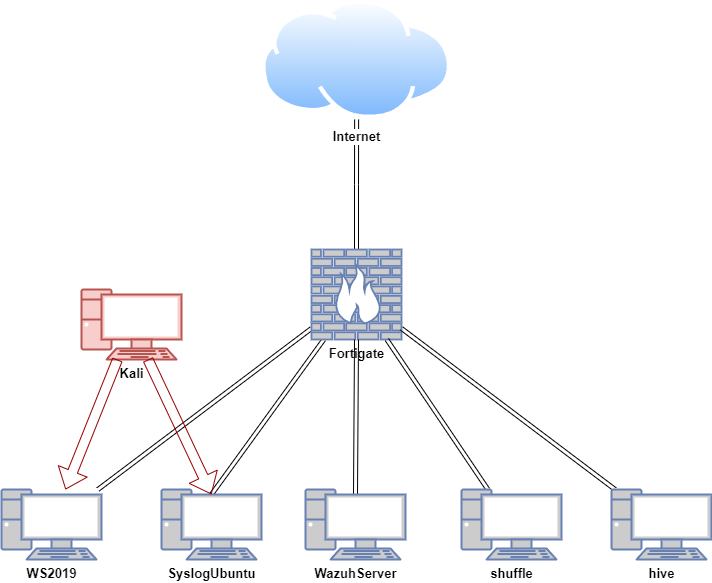
In this proof of concept, Shuffle is installed on an Ubuntu VM. Automated workflows were created using Shuffle, Wazuh, and TheHive. An attack simulation was conducted on the Windows and Ubuntu hosts in a safe and controlled environment.
| Host | OS | Role | IP Address |
|---|---|---|---|
| Fortigate | Fortios 7.6.0 | Firewall/Router | 192.168.1.111 (WAN) / 10.0.0.1 (LAN) |
| shuffle | Ubuntu 22.04 LTS | Shuffle (SOAR) | 10.0.0.28 |
| WazuhServer | Centos Stream 9 | Wazuh server (SIEM server) | 10.0.0.20 |
| hive | Ubuntu 22.04 LTS | TheHive (IR) | 10.0.0.40 |
| WS2019 | Windows Server 2019 | Wazuh agent (SIEM client) | 10.0.0.24 |
| SyslogUbuntu | Ubuntu 22.04 LTS | Wazuh agent, rsyslog server | 10.0.0.26 |
| Kali | Kali Linux 2024.2 | Attacker machine | 192.168.1.161, 10.0.0.29 |