Snort
Build a Snort 3 network-detection lab, validate local and community rules, analyse saved traffic, and introduce inline prevention only after defining a safe rollback path.
What Snort does
Snort is an open-source network intrusion detection and prevention system maintained by Cisco. It monitors network traffic in real time and combines protocol analysis, content inspection and detection rules to identify attacks, probes, scans and other suspicious activity.
Watch the Snort introduction on YouTube
Original PoC preserved
The original single-page proof of concept has been reorganised into the journeys below. Historical commands, outputs and screenshots are retained in context and labelled when a current build may behave differently. In that PoC, Snort 3 ran on an Ubuntu virtual machine and a Kali virtual machine generated authorised test traffic in a safe, controlled lab. The connected preparation steps supported an otherwise air-gapped installation workflow.
Choose your journey
Complete the journeys in order for a full proof of concept, or choose the task that matches an existing lab.
Before you begin
Documented baseline
The original proof of concept used Snort 3.3.5.0, LibDAQ 3.0.16, Ubuntu
22.04 LTS and pfSense 2.7.2. Treat that combination as historical evidence,
not as the recommended current release. For a new build, select one supported
Snort/LibDAQ/rules combination from the official downloads, record exact
filenames and checksums, and validate it before moving files into an isolated
environment.
| Component | Historical PoC | Record for a new build |
|---|---|---|
| Snort | 3.3.5.0 |
Exact release and source checksum |
| LibDAQ | 3.0.16 |
Exact compatible release and DAQ modules |
| Sensor OS | Ubuntu 22.04 LTS | OS release, architecture and patch date |
| Rules | Community and registered examples | Package name, release, licence and checksum |
| Gateway option | pfSense 2.7.2 | pfSense and package versions |
Use an isolated, authorised lab
Packet capture can expose sensitive data, and inline testing can interrupt access or production traffic. Use disposable systems, obtain authorisation, keep console access, take snapshots, and document cleanup before testing.
Before starting, prepare:
- an x86-64 Ubuntu sensor with two interfaces if testing AFPacket inline mode;
- a separate, isolated traffic-generation host;
- working time synchronisation and enough storage for alerts and PCAPs;
- verified installation and rules packages; and
- a known-good snapshot or recovery method.
How data moves through this PoC
Troubleshoot from left to right. Prove that traffic reaches the selected DAQ before changing inspectors, variables, rules or outputs.
Troubleshooting shortcuts
| Symptom | Start here |
|---|---|
| Snort does not start | Validate the configuration and confirm the binary, library and DAQ paths on the installation page |
| A local rule never fires | Check HOME_NET, interface selection and both tests on the local-rules page |
| A downloaded ruleset fails | Confirm engine compatibility and validate it before activation on the rule-management page |
| Inline traffic stops unexpectedly | Use console access and execute the rollback on the inline IPS page |
| PCAP results differ | Compare the engine, configuration, ruleset and checksum recorded on the PCAP page |
Lab architecture
| Host | OS | Role | Historical address |
|---|---|---|---|
| pfSense | FreeBSD / pfSense | Optional gateway sensor | 192.168.1.200 WAN / 10.0.0.2 LAN |
| Snort | Ubuntu 22.04 LTS | Host sensor | 10.0.0.22 |
| WS2019 | Windows Server 2019 | Test client | 10.0.0.24 |
| Kali | Kali Linux | Controlled traffic source | 10.0.0.29 |
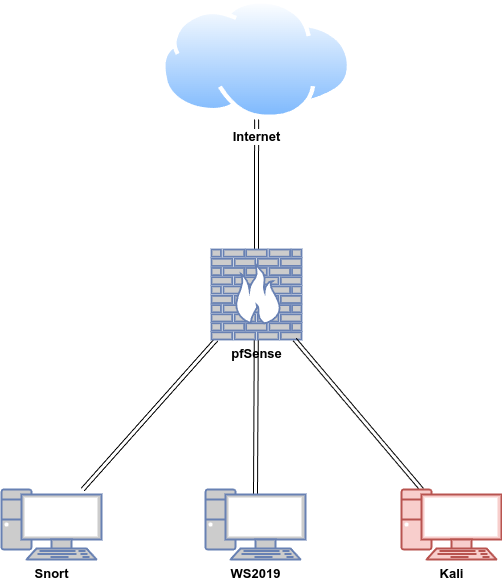
Original walkthrough map
Use this map if you previously followed the single-page version. The sequence and evidence have moved, but the PoC topics remain available.
| Original topic | New location |
|---|---|
| Install Snort 3 on the Ubuntu host | Install Snort 3 |
| Offline prerequisites and source dependencies | Prepare the connected build bundle |
| LibDAQ, optional dependencies and engine validation | Build LibDAQ and Snort |
| Disable receive offloading and verify capture | Configure capture prerequisites |
| Test IDS with ICMP and SSH local rules | Create and Test Local Rules |
| Install and configure PulledPork 3 | Manage Snort Rules |
| Test the community ruleset | Historical community-rules validation |
| Test IPS with AFPacket or NFQUEUE | Test Inline Prevention |
| Install rules offline | Offline community-rules workflow |
| Read the Pikabot PCAP with Snort | Historical Pikabot exercise |
| Install and test Snort on pfSense | Run Snort on pfSense |
| Rebuild and extend the complete lab | Build Your Snort Lab |