Splunk
This page documents the Splunk Enterprise proof of concept demonstrated in the accompanying videos. It also provides optional procedures and hands-on activities for readers who want to reproduce selected outcomes in their own authorised lab. The videos show the original build; the practice activities ask you to validate the same capabilities in an environment of your own.
What Splunk does
Splunk Enterprise is a Security Information and Event Management (SIEM) platform that is typically installed on a server. It collects and indexes many types of data so that analysts can search, analyse, and visualise events.
Splunk Universal Forwarders are lightweight clients installed on monitored systems. They provide reliable, secure data collection and forward events to Splunk Enterprise for indexing. This guide covers both sides of that data path: installing Splunk Enterprise and configuring Universal Forwarders.
Watch the Splunk lab overview on YouTube
Choose your journey
You do not need to complete every section. Choose the journey that matches what you want to accomplish:
If you are building the complete lab, review the lab setup first and complete journeys 1–5 in sequence.
Follow the machine and account context
Each procedure identifies the machine where the action is performed. Pay
close attention to whether a command should run as a standard user,
root, or the splunk service account.
Optional and alternative paths
Sections marked Optional, Option 1, Option 2, or Annex are not all required. In particular, use only one FortiGate ingestion method in a normal deployment.
How data moves through this PoC
When troubleshooting, follow this path from left to right. Confirm that the source generated an event before checking transport, ingestion, metadata, and search behaviour.
Before you begin
Tested versions
The PoC records a tested combination, not a promise that every later release uses identical screens or configuration. Check current vendor requirements before substituting versions.
| Component | Version used in the PoC | Notes |
|---|---|---|
| Splunk Enterprise | 9.4.1 | Linux .tgz package |
| Splunk Universal Forwarder | 9.3.x–9.4.x | Examples include output from both versions |
| SC4S | 3.34.3 | Container image used in the offline workflow |
| Splunk server OS | Ubuntu 24.04 | Ubuntu 22.04 download examples are also retained |
| FortiGate | FortiOS 7.6.0 | Lab firewall and syslog source |
Validate before rebuilding
Review the current Splunk Enterprise system requirements and the release notes for each add-on before downloading packages for a new environment.
You will need:
- an internet-connected Ubuntu machine to prepare the offline package;
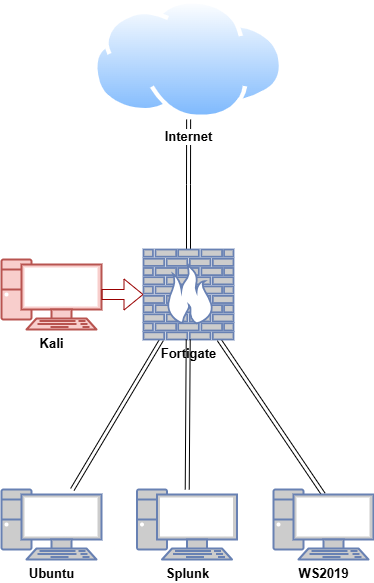
- the isolated lab machines and network shown below;
- Splunk Enterprise and Universal Forwarder installation packages;
- the required Splunk add-ons and SC4S image; and
- administrator access to the Linux, Windows, and network devices.
Troubleshooting shortcuts
| Problem | Start here |
|---|---|
| Splunk Web does not open | Verify the installation |
| SC4S does not start or reach HEC | Test SC4S |
| FortiGate events do not appear | Test SC4S or test the FortiGate app |
| A forwarder is missing | Verify Windows or verify Linux |
| An index is empty | Check the add-on indexes and Sysmon ingestion |
Lab Setup for Proof of Concept
In this proof of concept, Splunk Enterprise was installed on an Ubuntu VM (Virtual Machine), and the Splunk Universal Forwarder was installed on both Ubuntu and Windows VMs. An attack emulation was conducted on the FortiGate VM in a safe and controlled environment.
Use an isolated, authorised lab
Do not replicate the attack emulation unless you are properly trained and authorised to do so. Unauthorised testing can cause unintended damage and have legal consequences.
Lab machines
| Hostname | OS | Role | IP Address |
|---|---|---|---|
| Fortigate | Fortios 7.6.0 | Firewall/Router | 192.168.1.10 (WAN) / |
| 10.0.0.1 (LAN) | |||
| Splunk | Ubuntu 24.04 | Splunk Enterprise (server), SC4S | 10.0.0.100 |
| Ubuntu | Ubuntu 24.04 | Splunk Universal Forwarder (Linux client) | 10.0.0.200 |
| WS2019 | Windows Server 2019 | Splunk Universal Forwarder (Windows client) | 10.0.0.50 |
| Kali | Kali Linux 2025.1 | Attacker machine | 10.0.0.22 |