Suricata
Build a Suricata network-detection lab, validate local and managed rules, investigate EVE JSON, analyse saved traffic, and introduce blocking only after defining a safe rollback path.
What Suricata does
Suricata is an open-source network threat-detection engine maintained by the Open Information Security Foundation. It supports real-time intrusion detection, inline intrusion prevention, network security monitoring, and offline PCAP processing. Its EVE JSON output provides structured alert, flow, DNS, HTTP, TLS, file, and statistics events for investigation and integration.
Watch the Suricata introduction on YouTube
Watch the supporting Suricata demonstration
Choose your journey
Complete the journeys in order for a full proof of concept, or choose the task that matches an existing authorised lab.
Before you begin
Documented baseline
The original PoC used Suricata 7.0.6, Ubuntu 22.04 LTS, the ET Open ruleset,
and pfSense 2.7.2. Treat that combination as historical evidence. For a new
build, record the exact engine, operating system, capture method, ruleset,
package filenames, checksums, and validation date.
| Component | Historical PoC | Record for a new build |
|---|---|---|
| Suricata | 7.0.6 |
Exact package version and repository |
| Sensor OS | Ubuntu 22.04 LTS | OS release, architecture, and patch date |
| Rules | ET Open | Source, licence, update time, and checksum |
| Host capture | AF_PACKET / NFQUEUE examples | Interface, mode, and offload state |
| Gateway option | pfSense 2.7.2 | pfSense and Suricata package versions |
Use an isolated, authorised lab
Packet capture can expose sensitive data, and inline testing can interrupt access. Use disposable systems, keep console access, take snapshots, and prepare cleanup before generating test traffic or enabling blocking.
How data moves through this PoC
Troubleshoot from left to right. Prove that traffic reaches the selected capture path before changing variables, rules, outputs, or blocking policy.
Troubleshooting shortcuts
| Symptom | Start here |
|---|---|
| Service is not running | Validate installation and inspect the journal |
| Local rule never fires | Check HOME_NET, interface, SID, and both tests |
| Downloaded rules fail | Stage and validate before activation |
| Inline traffic stops | Execute the prepared rollback |
| PCAP results differ | Compare engine, config, rules, and checksums |
Lab architecture
| Host | OS | Role | Historical address |
|---|---|---|---|
| pfSense | FreeBSD / pfSense | Optional gateway IDS/IPS | 192.168.1.200 WAN / 10.0.0.2 LAN |
| Suricata | Ubuntu 22.04 LTS | Host IDS/IPS | 10.0.0.27 |
| WS2019 | Windows Server 2019 | Controlled test client simulating a compromised host | 10.0.0.24 |
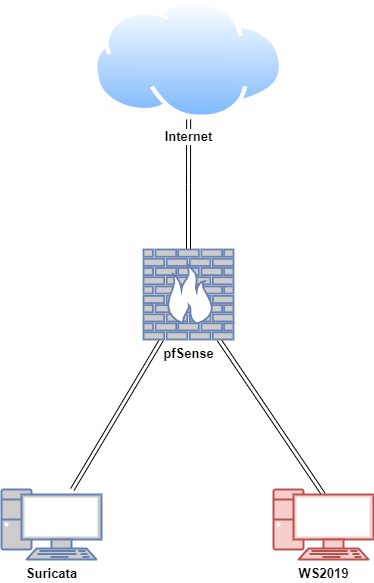
In the demonstrated PoC, WS2019 represented a compromised machine and visited controlled test websites to trigger Suricata signatures. Preserve that packet-to-alert objective in a new build, but prefer locally controlled fixtures where possible because public destinations, redirects, DNS answers, and downloaded signatures can change.