TheHive
Use this guide to understand TheHive, deploy it in an isolated lab, and practise managing a security incident from alert triage through case closure.
What TheHive does
TheHive is an open-source security incident response platform designed to help organisations efficiently manage and respond to cybersecurity incidents. Developed to facilitate collaboration among security teams, it provides a centralised system for tracking and investigating security events, alerts, and cases.
Analysts can use a shared case to record evidence, ownership, decisions, approvals, and closure without relying on an external chat transcript.
Choose your journey
You do not need to complete both journeys. Start with the browser simulation if you want to learn the case workflow without installing anything.
How a case moves
Follow the case from left to right. Confirm the alert and its context before promoting it, preserve relevant observables, give every task an owner, and record the evidence behind the closure decision.
Before you begin
Versions used in this lab
These versions document the lab configuration used in this guide. Check current vendor requirements before substituting components or using the design outside an isolated environment.
| Component | Version used | Context |
|---|---|---|
| TheHive | 5.2.14 | Offline package used in this guide |
| Cassandra | 4.0.13 | Case data store |
| Elasticsearch | 8.15.1 | Search index used in the demonstration |
| Java | OpenJDK 11 | TheHive runtime |
| TheHive VM | Ubuntu 22.04 LTS | Single-node proof of concept |
| FortiGate | FortiOS 7.6.0 | Lab firewall and router |
Validate component compatibility before building
This lab records TheHive 5.2.14 with Elasticsearch 8.15.1, while current StrangeBee guidance lists Elasticsearch 7.2.x–7.17.x for TheHive 5.0.0–5.2.16. Select a supported combination for a new build and review the official software requirements before downloading packages.
You will need:
- an isolated Ubuntu VM with a snapshot or other recovery point;
- an internet-connected preparation host for the offline package;
- administrator access to both machines; and
- enough memory and storage for TheHive, Cassandra, and the search service.
Troubleshooting shortcuts
| Problem | Start here |
|---|---|
| TheHive page does not open | Verify TheHive and TCP 9000. |
| TheHive starts but cannot create a case | Verify Cassandra. |
| Search or indexing fails | Verify Elasticsearch. |
| Login fails | Check the administrator account. |
Use an isolated, authorised lab
Use only synthetic observables and systems you own or are authorised to manage. Do not connect training actions to production accounts, endpoints, or network controls.
Lab setup
In this proof of concept, TheHive was installed on an Ubuntu Virtual Machine (VM).
| Host | OS | Role | IP Address |
|---|---|---|---|
| Fortigate | Fortios 7.6.0 | Firewall/Router | 192.168.1.111 (WAN) / 10.0.0.1 (LAN) |
| hive | Ubuntu 22.04 LTS | TheHive VM | 10.0.0.40 |
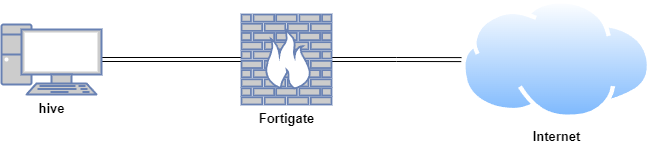
TheHive lab topology used throughout this guide.