Wireshark
This page documents the Wireshark proof of concept demonstrated in the accompanying video. It also provides a detailed, hands-on exercise using saved packet captures. You can follow the complete page or choose only the activity that matches your goal.
What Wireshark does
Wireshark is a free and open-source network protocol analyser widely used for network troubleshooting, analysis, software and protocol development, and education. It allows you to capture and examine packets travelling through a network in real time or from saved packet capture (PCAP) files.
Watch the Wireshark overview on YouTube
Choose your journey
You do not need to complete every activity. Choose the journey that matches your analysis goal, or use the Hands-on Labs page to complete the full evidence workflow.
Capture filters and display filters are different
A capture filter limits which packets Wireshark records. A display
filter, such as http.request or ip.addr == 10.0.0.22, changes which
packets from an existing capture are shown. The analysis exercises on this
page use display filters.
Before you begin
Tested environment
The screenshots record a proof-of-concept environment, not a guarantee that later releases use identical menus or package names. Check the current Wireshark documentation and operating-system requirements before substituting versions.
| Component | Version used in the PoC | Notes |
|---|---|---|
| Wireshark | Screens shown in the accompanying demonstration | Later releases may differ visually |
| Windows analysis host | Windows Server 2019 | Npcap is required for live packet capture |
| Linux lab host | Ubuntu package-based installation | Offline dependency names vary by Ubuntu release |
| FortiGate | FortiOS 7.6.0 | Used in the local lab topology |
| Kali Linux | 2024.2 | Used in the local lab topology |
Record the exact Wireshark, Npcap, operating-system, and package versions used in your own build. Also record the validation date, download source, and a cryptographic checksum for external PCAP archives before transferring them to the isolated lab.
You will need administrator access to install packet-capture components. For the malware-analysis activities, use a disposable, isolated VM with sufficient storage for the PCAPs and exported objects.
How evidence moves through this PoC
When troubleshooting, follow this path from left to right. Confirm that the capture contains the expected packets before checking protocol decoding, display filters, stream completeness, object export, and hash validation.
Lab Setup for Proof of Concept
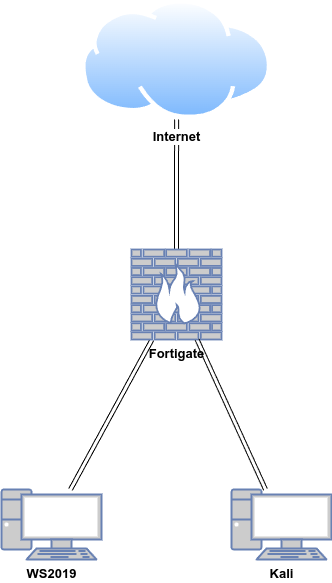
In this proof of concept, Wireshark was installed on a Windows virtual machine (VM), and malware traffic analysis was conducted using Wireshark. The topology below represents the local capture lab. The later malware-analysis exercises use prerecorded PCAPs supplied by Palo Alto Networks Unit 42 and do not depend on the FortiGate or Kali machines in this topology.
| Host | OS | Role | IP Address |
|---|---|---|---|
| Fortigate | Fortios 7.6.0 | Firewall/Router | 192.168.1.111 (WAN) / 10.0.0.1 (LAN) |
| WS2019 | Windows Server 2019 | Wireshark | 10.0.0.40 |
| Kali | Kali Linux 2024.2 | Linux Client | 10.0.0.22 |
Capture only authorised traffic
Packet captures can contain credentials, personal data, and confidential communications. Capture and inspect traffic only on systems and networks you own or are explicitly authorised to test.